
How to Choose Home Inspection Software (2026 Buyer's Guide)
On this page
- Start with how you work, not the feature list
- The 7 questions to ask before you buy
- 1. What does it actually cost as I grow?
- 2. Is anything I need locked behind a higher tier?
- 3. Who controls my data — and can I leave?
- 4. Does the field app truly work offline?
- 5. How good (and how flexible) are the reports?
- 6. Does it handle the business side?
- 7. What's the trial and refund policy?
- A simple scoring method
- Don't switch without a reason — but know your options
How to Choose Home Inspection Software (2026 Buyer's Guide)
The wrong inspection software costs you twice: once in the monthly bill, and again in the hours you lose fighting it in the field. This guide walks through what actually matters when you choose — independent of any one vendor. (We make Inspector Hub; where another tool fits better, we say so.)
Start with how you work, not the feature list
Every platform demos well. The question is whether it fits your day:
- Solo inspector? You want speed and low, predictable cost — not a platform priced for a 10-person firm.
- Small team (2–5)? Per-seat economics and role management matter more than any single feature.
- Report-heavy niche (commercial, mold, radon)? Template flexibility and custom fields move to the top.
Write down your real workflow first. Then judge software against it.
The 7 questions to ask before you buy
1. What does it actually cost as I grow?
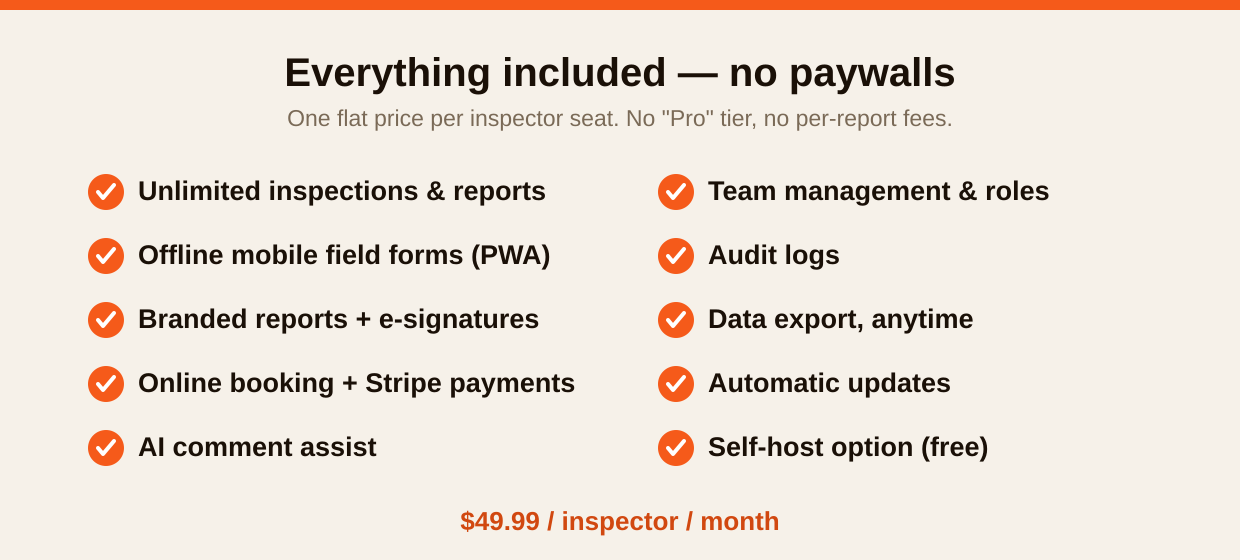
"Starting at $X" rarely survives contact with reality. Check three things: the base price, whether added inspectors are billed separately, and whether there are per-report or per-published-inspection fees. A flat per-seat price (like Inspector Hub's $49.99) is the easiest to forecast; tier + usage pricing can balloon as volume climbs.
2. Is anything I need locked behind a higher tier?
AI comment assist, e-signatures, premium templates, and team features are common upsells. Map the features you need to the tier that actually includes them — that's your real price.
3. Who controls my data — and can I leave?
This is the question most inspectors skip and later regret. Ask: Can I export everything (inspections, templates, clients, history) in standard formats, anytime, myself? And the deeper one: if the vendor raises prices, gets acquired, or shuts down, what's my exit? Open-source software (such as Inspector Hub, published under AGPL v3) is the only category where the answer is "you can run the exact same software yourself, free" — no proprietary tool can match that guarantee.
4. Does the field app truly work offline?
Crawlspaces, basements, and rural homes don't have signal. The app must let you capture photos and findings offline and sync when you're back online. Test this on a real inspection during the trial — don't take the demo's word for it.
5. How good (and how flexible) are the reports?
Your report is your product to the client and the agent. Check: branded/white-label output, e-signatures, photo handling, and how easily you can customize templates and comments. Generate a full sample report during the trial and read it on a phone — that's how most clients open it.
6. Does it handle the business side?
Online booking, payment collection (e.g. Stripe), scheduling, and agreements save real time. Decide which you need built-in vs. via integration.
7. What's the trial and refund policy?
A trial period with no credit card lets you test on real jobs without commitment. A money-back guarantee that follows every paid month removes the rest of the risk. If a vendor won't let you try before you pay, that's a signal.
A simple scoring method
Rate each candidate 1–5 on the questions that matter to you, then weight them. Most inspectors end up weighting predictable cost, data ownership, and offline reliability highest — because those are the ones that hurt most when they go wrong.
| Criterion | Weight | Tool A | Tool B |
|---|---|---|---|
| Predictable total cost | ×3 | ||
| Data ownership / exit | ×3 | ||
| Offline field reliability | ×2 | ||
| Report quality & flexibility | ×2 | ||
| Business features (booking/pay) | ×1 |
Don't switch without a reason — but know your options
If your current tool fits and scales fine, switching isn't worth the disruption. But if you're feeling the squeeze of climbing tiers, per-report fees, or uncertainty about who owns your data, it's worth running a free trial of an alternative in parallel.
Want to test the data-ownership angle for yourself? Inspector Hub is open source — read the code on GitHub before you ever sign up, then start free — 5 inspections on us with no credit card.
Last updated June 2026.
Keep reading
Home Inspection Report Software: What Makes a Great Report (2026)
Home inspection report software that produces branded, mobile-friendly reports with photos, e-signatures, and AI comment assist — at $49.99/seat, all included. What to look for in report software in 2026.
ReadHome Inspection Software Pricing: A 2026 Guide to What You'll Really Pay
A clear 2026 guide to home inspection software pricing: base prices, per-inspector charges, per-report fees, and premium tiers — and how to calculate your real monthly cost before you buy.
ReadOpen-Source Home Inspection Software: What It Means & Why It Matters
What open-source home inspection software actually means for inspectors: no vendor lock-in, auditable data handling, free self-hosting, and protection from price hikes and acquisitions.
ReadRun inspections on software you control
Inspector Hub gives you modern field reports and a client portal — hosted for you, or run it yourself free on the open-source OpenInspection engine. Your data, always yours.