
Automations
Documentation
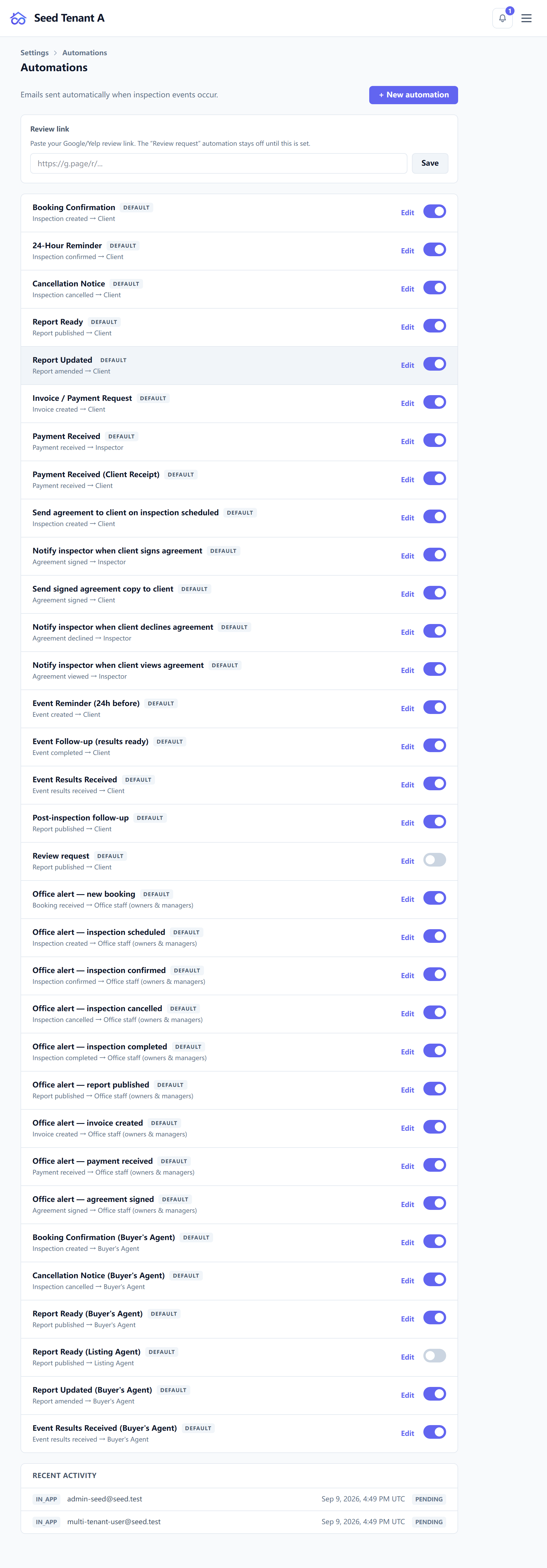
An automation is a standing instruction: when this happens, send that, to these people, after this long. Settings → Automations is where they live, and it is where you look when a message did not arrive.
What a rule is made of
| Part | What it decides |
|---|---|
| Trigger | The event that starts it |
| Recipient | Who receives it |
| Delay | How long after the trigger it goes |
| Channels | Email, text, or both |
| Template | The wording, from Messages and templates |
| Conditions | An optional narrowing, so a rule does not fire on every case |
What can trigger one
Eighteen events, which group like this:
The job — created, confirmed, cancelled, a reminder before it, completed.
The report — published, and amended. These are deliberately separate: the first says "here is your report", the second says "this changed, and here is why". A client should never get the first sentence twice.
Money — an invoice created, a payment received.
The agreement — sent and viewed, one signer signed, everyone signed, declined, expired. The per-signer trigger exists because an envelope with three signers has three interesting moments, not one.
Visits — created, completed, results received. That last one is what turns "the lab came back" into a message without anybody watching for it.
And a booking received, which is how the office learns a request came in.
Who a rule reaches
Four kinds of recipient:
- A role on the inspection — the client, the buyer's agent, whoever holds that role on the job that fired the rule. This is the one most rules want.
- The assigned inspector.
- All staff, or everyone on the inspection.
Choosing a role rather than a person is what makes a rule survive a staffing change.
Whether it fired
The same page shows a recent log: each attempt, its recipient, its channel, when it was due, and how it ended.
Three outcomes to read differently:
| Status | Means |
|---|---|
| Sent | It went to the provider |
| Failed | It was attempted and rejected — the error is on the row |
| Skipped | The rule matched but the send was not made |
Skipped is the one people misread. It is not a failure; it is the system declining to send — no consent on that channel, no address, a condition that excluded this case, a required template that is missing. A rule sitting at skipped forever is usually a configuration answer, not an outage.
When a message did not arrive
Work down this order — it is the fastest path in practice:
- Is there a rule at all? An edited template with no rule behind it sends nothing. This is the most common cause by a distance.
- Did it fire? Check the log for that inspection's window.
- Sent, but not received? Then it is a delivery question, not an automation one — see When a message does not arrive.