
State and statutory forms
Documentation
Some jurisdictions do not accept your report layout. They publish a form, and what they want back is that form, filled in — a Florida wind mitigation form, a state disclosure, an insurer's roof condition form.
Inspector Hub produces those by printing your answers onto the authority's own published document. That single fact drives everything on this page, including the parts that look like extra work.
⚠️ Producing the finished PDF is not switched on for the hosted service yet. Everything else described here works: installing the form, supplying the authority's document, filling in the boxes an inspection needs. The render itself costs seconds of CPU for a single document, which is over the ceiling a single request is allowed, and that is being fixed before the last step is turned on.
Self-hosting? The same ceiling applies to your deployment, so a deployment that produces statutory forms needs a paid Cloudflare Workers plan. On the free tier the download fails rather than being refused politely — there is no check in front of it today.
Which forms exist is a property of the software you are running, not of your workspace — a form arrives with a release, together with the map of where each answer prints on the page. Today that is four:
| On the marketplace shelf | The authority's own name for it |
|---|---|
| Florida OIR-B1-1802 Uniform Mitigation Verification | Florida Office of Insurance Regulation Uniform Mitigation Verification Inspection Form — the wind mitigation form |
| Florida Citizens 4-Point Inspection | Citizens Property Insurance Corporation 4-Point Inspection Form |
| Florida Citizens Roof Inspection | Citizens Property Insurance Corporation Roof Inspection Form |
| Texas TREC REI 7-6 | Texas Real Estate Commission Property Inspection Report |
⚠️ A third naming exists. Settings → Statutory form PDFs lists each one by
its internal id — fl_oir_b1_1802, tx_trec_rei — beside the revision. Match
on the revision (Rev. 04/26, REI 7-6), which is printed on the authority's
document itself, rather than on the id.
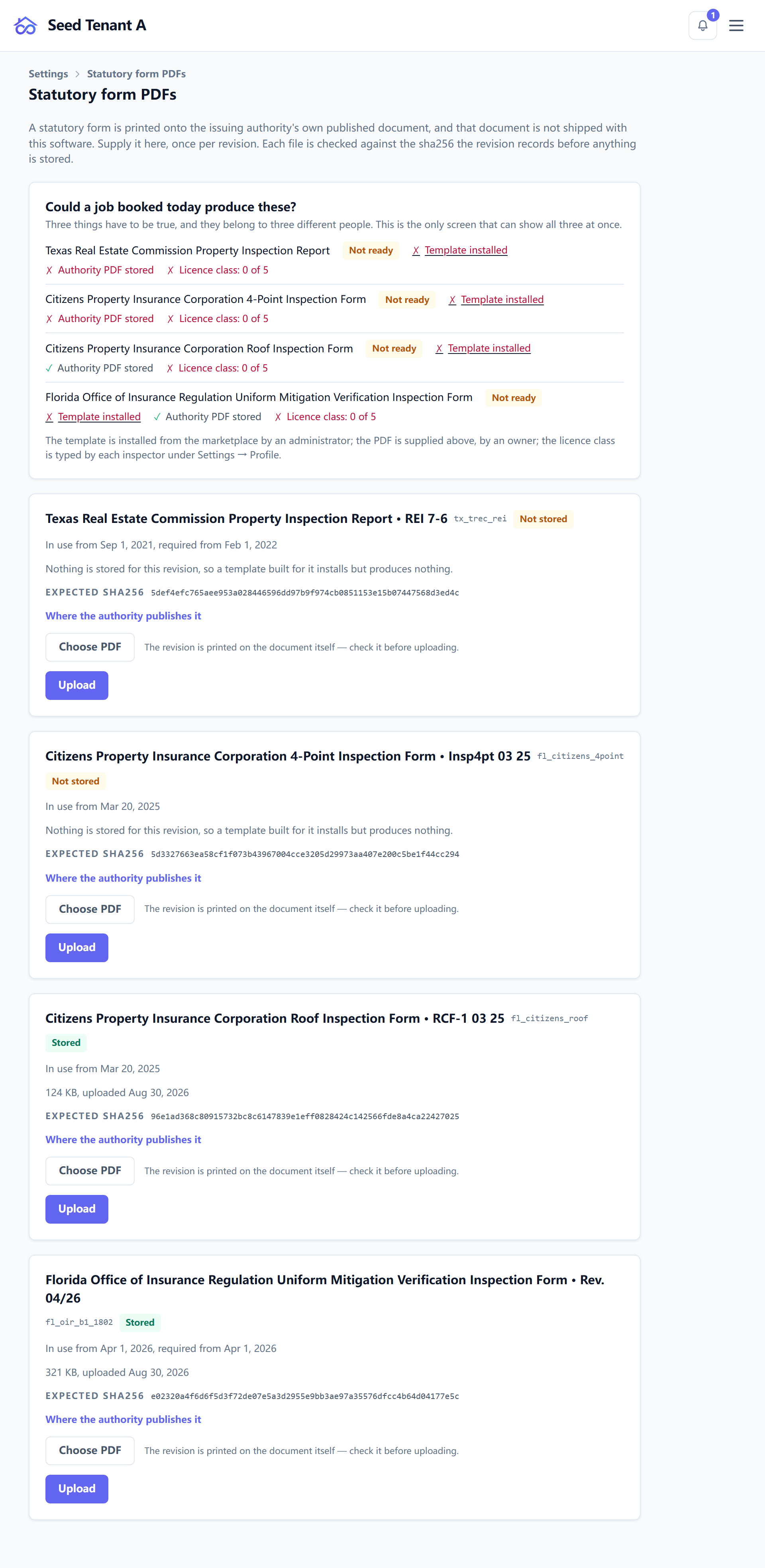
Three things have to be true before a form can be produced
Miss any one of them and the failure arrives late — usually at the moment somebody expected a PDF.
1. The template is installed
Statutory forms arrive through the marketplace, under the Statutory tab. Installing one gives you a template that asks the form's questions in the form's own order — see Your content library and the marketplace.
2. The authority's PDF is stored, once per revision
Settings → Statutory form PDFs — owner only. This is not one of the nine adjustable permissions: the guard is the owner role itself, because the file is a property of the deployment rather than of a workspace. A manager opening the page would be offered an upload that is refused.
The authority's document is not shipped with the software — it is theirs to publish and ours to print onto — so somebody has to supply it, once for each revision, for the whole deployment.
Each revision row states its own status: Stored, Not stored, or Withdrawn, with the size and date for the ones that are there. A revision that is not stored is the quiet failure worth knowing about: a template built for it installs but produces nothing.
The upload is checked before it is kept. Every revision records the sha256 of the exact document it expects, and a file that does not match is refused with that hash, the address the authority publishes at, and the reminder that the revision is printed inside the document, not in its filename. Downloading the wrong year's PDF is the ordinary mistake here, and it is caught rather than stored.
Two other states this page reports rather than hides:
- No object storage bound — an uploaded file would have nowhere to go, and nothing on the page can succeed until a bucket is bound.
- This build publishes no statutory forms — there is nothing to supply. A revision arrives with a software update, together with the map of where each answer prints on the page. It cannot be added from this screen.
3. The inspector's printed identity is filled in
The form prints who inspected the property, and it asks in the authority's words rather than yours. Settings → Profile carries a State licence class — written exactly as the authority names it, e.g. "Florida-licensed home inspector" — which prints in the form's own License Type box.
That is not the same field as an association certification. Those stay under Licenses & affiliations and are not printed here.
Revisions follow the inspection date, not today's date
An authority replaces a form on a date, and inspections either side of that date belong to different revisions. The product resolves this by the inspection's own date, never by when you happen to open it — which is why an old job re-opened next year still produces the form it was always going to.
The editor says which case you are in rather than leaving it to be inferred:
| What you see | What it means |
|---|---|
| A newer revision replaces this form on a date | Your inspection is dated before it. Nothing to do. |
| A newer revision took effect on a date | Your inspection is dated before it, so it is still produced from the earlier revision. That is correct. |
| This form cannot be produced for this inspection | The inspection's date falls under a revision this template does not produce. Ask an administrator to update the template, then start the inspection again on the updated one. |
| The revision was withdrawn | A defect was found in the map of where answers print. The form is not produced from it. |
The third row is the one that costs time, and it is the reason the next section exists.
Updating a template says what the update costs
Updating a statutory template is not a silent version bump, because inspections already in progress are sitting on the old one. So the confirmation counts them first and reports both halves:
- how many in-progress inspections stay on the current revision and still produce their form — their dates fall inside its window;
- how many are dated under the newer revision and cannot produce the form at all, and therefore have to be started again on the updated template.
Where neither applies it says so — "no inspection is in progress on this template" — rather than showing a count of zero and leaving you to interpret it.
What an inspector fills in that no other job asks for
A statutory template adds a Statutory form details panel to the inspection. It appears only on inspections that produce a form, because these boxes are printed on the authority's document and asked for nowhere else.
Three of them surprise people, and all three are deliberate:
- Date signed is the day you sign the form, not the day of the visit. The form prints both.
- Property owner is not the client. A buyer commissions the inspection and the seller owns the house, so nothing here is filled in from the client record — on purpose.
- Employee name (printed) is the second signer some forms print beside yours. Leave it empty when your form has no such box.
The panel carries a running count — "14 of 22 form fields answered" — so the state of the form is visible while you work rather than at the end.
When the form has fewer slots than the property has
Statutory forms print a fixed number of slots: three roof coverings, two water heaters. Add one more and the editor says so plainly — "This form prints 3 roof covering slots, and this is one more" — and tells you where it will go instead.
Nothing is lost. The extra one is written into the destination the form provides for overflow, and it reads as a note rather than a filled box. That is the honest outcome, and knowing it before you sign is the point.
Where the form comes out
The completed form is a deliverable on the inspection hub, in its own card, named the way the form names itself rather than by an internal id.
The download is behind a notice, every time. Pressing it opens "Before you download this statutory form", which states the form, the revision, the effective date, and what has been declared about who produced it and who is responsible for it. The download is the button in that dialog — there is no second click to find afterwards, and the notice is not remembered, so it is shown for this form rather than once per browser.
It is not filed with the documents somebody uploaded, and it cannot be deleted: it is produced from the inspection, and re-produced whenever the inspection is.
← Your content library and the marketplace · Next: Message and document templates