
Your workspace and how it looks
Documentation
Settings → Workspace holds what is true of the company. Settings → Profile holds what is true of you. Getting a setting wrong is usually a matter of having looked in the wrong one of those two.
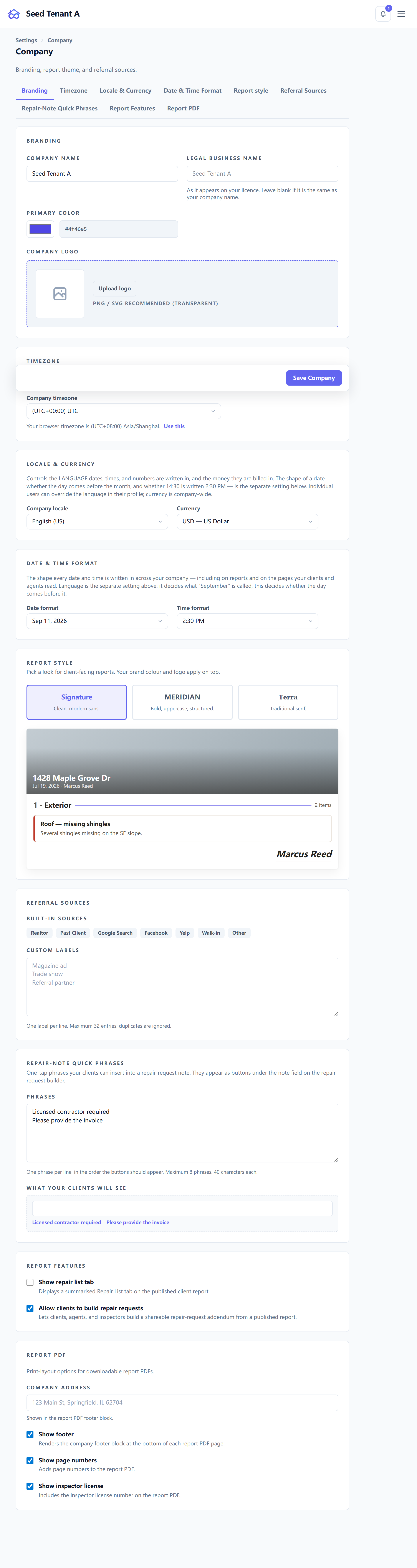
The two company names, and which documents use each
This is the setting most worth understanding, because the consequence of getting it wrong appears on a contract rather than on a screen.
| Field | What it is | Where it appears |
|---|---|---|
| Company name | Your trading brand — the name on the truck | Reports, the app, emails, and everything {{company_name}} resolves to |
| Legal name | The registered entity, as on your licence | Only agreements, signature certificates, the invoice "from" party, and the text-message compliance disclosure |
Leave the legal name empty if it is the same as your company name. Empty means "same as the trading name", and the substitution happens in one place rather than at every call site. A sole proprietor trading under their own registered name has one name and should not have to type it twice.
Fill it in when the two really differ — Cornerstone Home Inspections on the website, Cornerstone Property Services LLC on the contract. The documents in the right-hand column are the ones a court, an insurer or a regulator reads, and each of them wants the entity that can be sued, not the brand.
Branding
Your logo and primary colour apply everywhere a client sees you: the booking page, the report, the client portal, emails.
Self-hosted — with no company name configured, the deployment falls back to the name in its own environment, and to "OpenInspection" if that is unset too. Set the name here and the fallback stops mattering.
Timezone, locale, currency and date format
Four settings that decide how the same stored moment is rendered — they never change what was recorded:
- Timezone — the workspace default. The page can detect the browser's and offer it. Individuals can override it for themselves, and often should: a scheduler in another state wants their own clock.
- Locale and currency — the language and money format for the company. A currency chosen here is stamped onto each invoice as it is raised, so changing it later does not rewrite history.
- Date and time format — how dates read across the app and on documents.
Report defaults
The rest of the workspace page is what every new report inherits:
- Report style — the visual preset reports are rendered with.
- Report features — which optional blocks appear.
- Report PDF retention — how many years a rendered PDF is kept. The default is seven. Zero means keep indefinitely, and it is treated as a deliberate instruction rather than as an unset value.
- Referral sources — the "how did you hear about us" list, which you maintain.
- Repair quick phrases — the one-tap notes offered when building a repair request. Removing them all leaves none, rather than silently restoring the defaults; an empty list is a real answer here.
What is yours, not the company's
Settings → Profile is personal, and holds several things people go looking for under Workspace:
- Your details, and your photo — the photo appears on booking pages and beside your name on inspections.
- Your signature, including a saved one to reuse when pre-signing agreements.
- Your credentials — licences and certifications, with their images. These are snapshotted onto reports when they are published, so leaving an association later does not rewrite reports you have already delivered.
- Your notification settings — what reaches you, on which channel.
- Your timezone override, as above.
Settings → Account is not a page. It redirects to Settings → Security, which is where the password and session controls actually live.
Next in this section: Adding team members and setting permissions.